<?xml version="1.0" encoding="utf-8"?>
<feed xmlns="http://www.w3.org/2005/Atom">
	<title type="html"><![CDATA[Dropzone Forums — Floating Grid... how?]]></title>
	<link rel="self" href="https://forums.aptonic.com/feed/atom/topic/611/" />
	<updated>2025-09-04T08:11:19Z</updated>
	<generator>PunBB</generator>
	<id>https://forums.aptonic.com/topic/611/floating-grid-how/</id>
		<entry>
			<title type="html"><![CDATA[Re: Floating Grid... how?]]></title>
			<link rel="alternate" href="https://forums.aptonic.com/post/1614/#p1614" />
			<content type="html"><![CDATA[<p>Woohoo, so glad to see this get a shortcut! Thank you!! <img src="https://forums.aptonic.com/img/smilies/big_smile.png" width="15" height="15" alt="big_smile" /></p>]]></content>
			<author>
				<name><![CDATA[okenji]]></name>
				<uri>https://forums.aptonic.com/user/28491/</uri>
			</author>
			<updated>2025-09-04T08:11:19Z</updated>
			<id>https://forums.aptonic.com/post/1614/#p1614</id>
		</entry>
		<entry>
			<title type="html"><![CDATA[Re: Floating Grid... how?]]></title>
			<link rel="alternate" href="https://forums.aptonic.com/post/1600/#p1600" />
			<content type="html"><![CDATA[<p>Thanks, I didn&#039;t realise I needed to use Fn as well, all sorted now</p>]]></content>
			<author>
				<name><![CDATA[Punkawallah]]></name>
				<uri>https://forums.aptonic.com/user/28666/</uri>
			</author>
			<updated>2025-08-26T15:12:04Z</updated>
			<id>https://forums.aptonic.com/post/1600/#p1600</id>
		</entry>
		<entry>
			<title type="html"><![CDATA[Re: Floating Grid... how?]]></title>
			<link rel="alternate" href="https://forums.aptonic.com/post/1599/#p1599" />
			<content type="html"><![CDATA[<p>You may need to hold down Fn + F3 or F4. And what do you mean you can’t change the shortcuts? What happens when you try?</p>]]></content>
			<author>
				<name><![CDATA[John]]></name>
				<uri>https://forums.aptonic.com/user/2/</uri>
			</author>
			<updated>2025-08-26T14:14:41Z</updated>
			<id>https://forums.aptonic.com/post/1599/#p1599</id>
		</entry>
		<entry>
			<title type="html"><![CDATA[Re: Floating Grid... how?]]></title>
			<link rel="alternate" href="https://forums.aptonic.com/post/1598/#p1598" />
			<content type="html"><![CDATA[<p>Hi new user here! I am unable to either use the existing F3 and F4 shortcuts or, indeed change them to something else, any suggestions? Otherwise such as useful app, wish I&#039;d found it years ago!</p>]]></content>
			<author>
				<name><![CDATA[Punkawallah]]></name>
				<uri>https://forums.aptonic.com/user/28666/</uri>
			</author>
			<updated>2025-08-26T13:46:42Z</updated>
			<id>https://forums.aptonic.com/post/1598/#p1598</id>
		</entry>
		<entry>
			<title type="html"><![CDATA[Re: Floating Grid... how?]]></title>
			<link rel="alternate" href="https://forums.aptonic.com/post/1595/#p1595" />
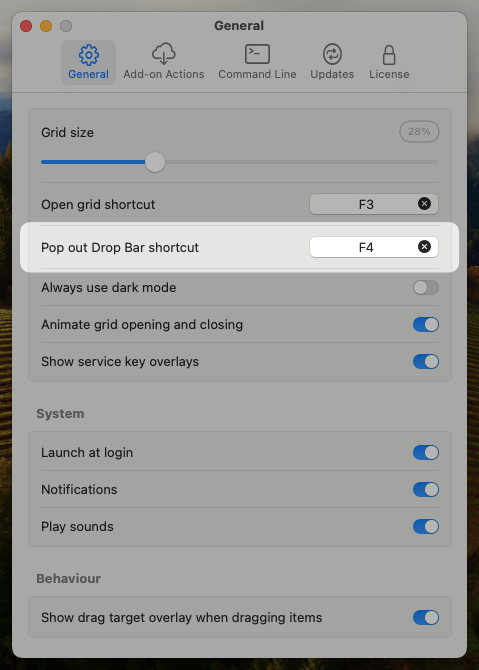
			<content type="html"><![CDATA[<p>The latest update (v4.80.67) adds the ability to set a keyboard shortcut to open floating Drop Bar. <br />It defaults to F4, but you can customize it in the Settings -&gt; General tab as shown below:</p><p><span class="postimg"><img src="https://aptonic123.s3.amazonaws.com/CleanShot%202025-08-26%20at%2022.22.34.png" alt="https://aptonic123.s3.amazonaws.com/CleanShot%202025-08-26%20at%2022.22.34.png" /></span></p>]]></content>
			<author>
				<name><![CDATA[John]]></name>
				<uri>https://forums.aptonic.com/user/2/</uri>
			</author>
			<updated>2025-08-26T10:24:47Z</updated>
			<id>https://forums.aptonic.com/post/1595/#p1595</id>
		</entry>
		<entry>
			<title type="html"><![CDATA[Re: Floating Grid... how?]]></title>
			<link rel="alternate" href="https://forums.aptonic.com/post/1591/#p1591" />
			<content type="html"><![CDATA[<p>You know, come to think of it a help doc with available shortcuts could be a handy place to send users as well. You helped me via email once and solved the issue by suggesting I press Command-R to refresh the grid, which I had no idea was a thing. </p><p>In any case, thanks again! Very grateful. <img src="https://forums.aptonic.com/img/smilies/smile.png" width="15" height="15" alt="smile" /></p>]]></content>
			<author>
				<name><![CDATA[okenji]]></name>
				<uri>https://forums.aptonic.com/user/28491/</uri>
			</author>
			<updated>2025-07-23T04:08:39Z</updated>
			<id>https://forums.aptonic.com/post/1591/#p1591</id>
		</entry>
		<entry>
			<title type="html"><![CDATA[Re: Floating Grid... how?]]></title>
			<link rel="alternate" href="https://forums.aptonic.com/post/1590/#p1590" />
			<content type="html"><![CDATA[<p>Great to hear <img src="https://forums.aptonic.com/img/smilies/smile.png" width="15" height="15" alt="smile" /> </p><p>Thanks for the feedback. Will try and remember to update here once the new shortcut is added.</p>]]></content>
			<author>
				<name><![CDATA[John]]></name>
				<uri>https://forums.aptonic.com/user/2/</uri>
			</author>
			<updated>2025-07-23T04:05:09Z</updated>
			<id>https://forums.aptonic.com/post/1590/#p1590</id>
		</entry>
		<entry>
			<title type="html"><![CDATA[Re: Floating Grid... how?]]></title>
			<link rel="alternate" href="https://forums.aptonic.com/post/1589/#p1589" />
			<content type="html"><![CDATA[<p>Oh yeah, nice tip!</p><p>Thanks for listening! Always get excited when I see DZ has a new update, it&#039;s always something good. <img src="https://forums.aptonic.com/img/smilies/cool.png" width="15" height="15" alt="cool" /></p><p>Cheers!</p>]]></content>
			<author>
				<name><![CDATA[okenji]]></name>
				<uri>https://forums.aptonic.com/user/28491/</uri>
			</author>
			<updated>2025-07-23T04:01:40Z</updated>
			<id>https://forums.aptonic.com/post/1589/#p1589</id>
		</entry>
		<entry>
			<title type="html"><![CDATA[Re: Floating Grid... how?]]></title>
			<link rel="alternate" href="https://forums.aptonic.com/post/1588/#p1588" />
			<content type="html"><![CDATA[<p>haha thats OK I appreciate the feedback - I think a keyboard shortcut to open it is a very good idea so will put this on the TODO list.</p><p>Note that you can currently also open the floating Drop Bar by holding the option key when dragging items onto Drop Bar in the main grid.</p>]]></content>
			<author>
				<name><![CDATA[John]]></name>
				<uri>https://forums.aptonic.com/user/2/</uri>
			</author>
			<updated>2025-07-23T03:57:06Z</updated>
			<id>https://forums.aptonic.com/post/1588/#p1588</id>
		</entry>
		<entry>
			<title type="html"><![CDATA[Re: Floating Grid... how?]]></title>
			<link rel="alternate" href="https://forums.aptonic.com/post/1587/#p1587" />
			<content type="html"><![CDATA[<p>Ohhhh I see, so it&#039;s the Drop Bar grid that&#039;s detatching, not the whole shebang? Okay cool.</p><p>Is there a chance that may get a keyboard shortcut toggle at some point as well? (Sorry, we&#039;re just never satisfied, are we? <img src="https://forums.aptonic.com/img/smilies/wink.png" width="15" height="15" alt="wink" /> )</p>]]></content>
			<author>
				<name><![CDATA[okenji]]></name>
				<uri>https://forums.aptonic.com/user/28491/</uri>
			</author>
			<updated>2025-07-23T03:50:56Z</updated>
			<id>https://forums.aptonic.com/post/1587/#p1587</id>
		</entry>
		<entry>
			<title type="html"><![CDATA[Re: Floating Grid... how?]]></title>
			<link rel="alternate" href="https://forums.aptonic.com/post/1586/#p1586" />
			<content type="html"><![CDATA[<p>Yep, this was just added - To use this, first update to the latest version (currently 4.80.63) then click on the window icon in the top right of the Dropzone grid or click on the &#039;Drop Bar&#039; item in the Dropzone grid. See screenshots below:</p><p><span class="postimg"><img src="https://aptonic123.s3.amazonaws.com/Detach-Drop-Bar.png" alt="https://aptonic123.s3.amazonaws.com/Detach-Drop-Bar.png" /></span></p><p><span class="postimg"><img src="https://aptonic123.s3.amazonaws.com/Drop-Bar-Detached.png" alt="https://aptonic123.s3.amazonaws.com/Drop-Bar-Detached.png" /></span></p>]]></content>
			<author>
				<name><![CDATA[John]]></name>
				<uri>https://forums.aptonic.com/user/2/</uri>
			</author>
			<updated>2025-07-23T03:43:18Z</updated>
			<id>https://forums.aptonic.com/post/1586/#p1586</id>
		</entry>
		<entry>
			<title type="html"><![CDATA[Floating Grid... how?]]></title>
			<link rel="alternate" href="https://forums.aptonic.com/post/1585/#p1585" />
			<content type="html"><![CDATA[<p>Seeing some mentions in the July update notes about a &#039;floating grid&#039; but not sure how to invoke that. Don&#039;t see anything in settings or in the UI. Is there a keyboard shortcut?</p>]]></content>
			<author>
				<name><![CDATA[okenji]]></name>
				<uri>https://forums.aptonic.com/user/28491/</uri>
			</author>
			<updated>2025-07-23T03:40:10Z</updated>
			<id>https://forums.aptonic.com/post/1585/#p1585</id>
		</entry>
</feed>